 Proferex
Check your campaigns in ChatGPT
Connect Proferex to ChatGPT. Type @Proferex to check your profit, compare offers or set up a campaign.
- Add Proferex under Plugins
- Ask with @Proferex
- Read reports and set up campaigns
Which campaigns are losing money this week?
Proferex: all campaigns, grouped by Campaign, last 7 days
Proferex: Pop - US - Mobile, grouped by Lander
2 campaigns lost money in the last 7 days. Pop - US - Mobile lost the most: -$31.20 on $166.20 of spend.
| Campaign | Profit | ROI |
|---|---|---|
| Pop - US - Mobile | -$31.20 | -18.77% |
| Pop - DE - Mobile | -$16.90 | -28.69% |
Here's the change I suggest: "Update combination". Open it in Proferex to review the details.
ProferexNo proposed changes yet.
Earlier
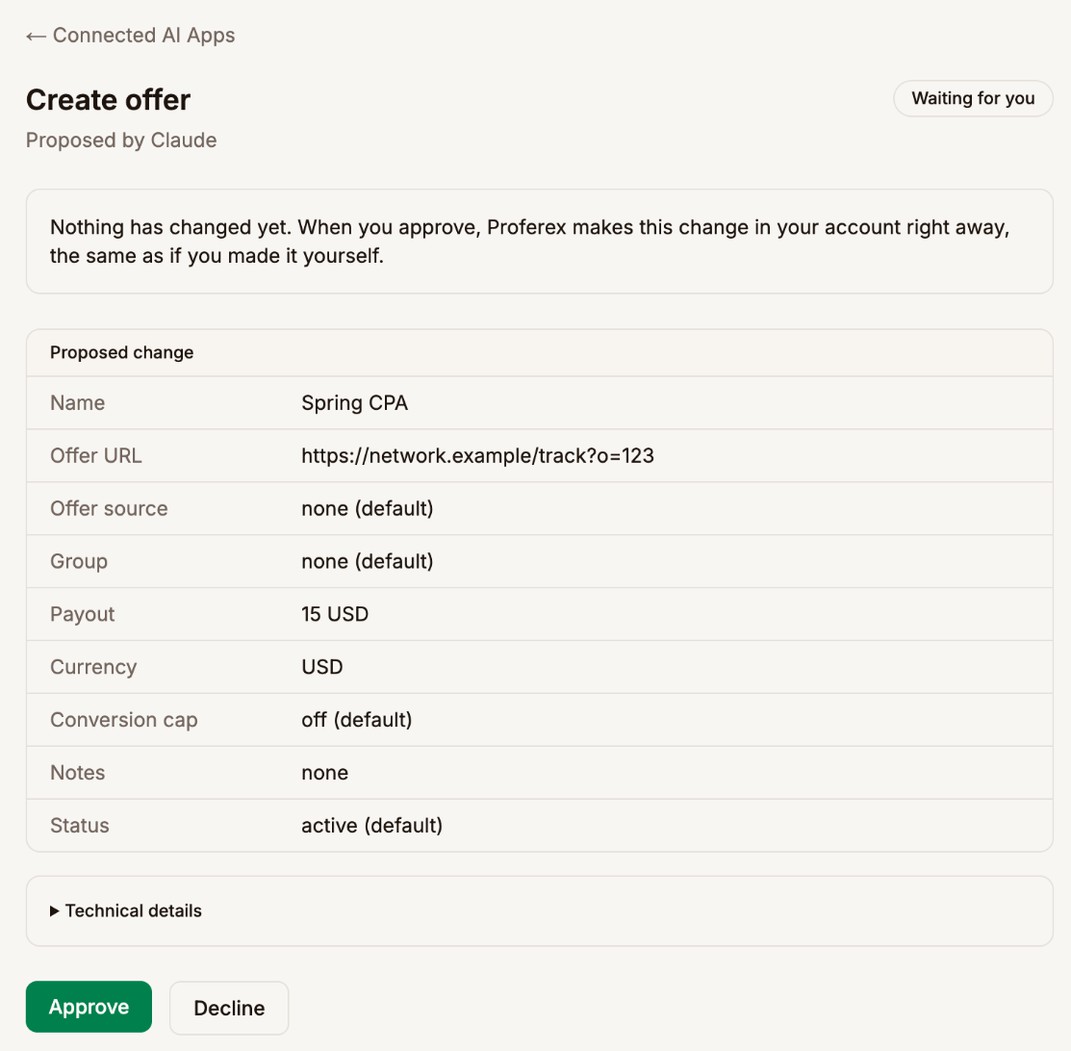
- Create offer: Spring CPAApproved
- Add note: paused 3 zonesApproved
- Delete lander: Old QuizDeclined
Setup
How do you add Proferex to ChatGPT?
Add the connection, then sign in to your Proferex account.
- 1In ChatGPT, open Plugins, click Add and choose Add custom MCP server.
- 2Name it Proferex, paste the address as the server URL and leave Authentication on OAuth.Address
https://www.proferex.com/api/mcp - 3Under Advanced OAuth settings, check that both read and write are ticked. Without write, ChatGPT can't propose changes.
- 4Tick I understand and want to continue, click Create as a plugin, then Connect Proferex.
- 5Proferex asks Connect ChatGPT to Proferex? Check the account and click Allow access.
Custom MCP servers need a paid ChatGPT plan, and OpenAI decides which plans get tools that make changes. If ChatGPT can read your stats but never proposes a change, check your plan on OpenAI's help page.
Read the full guide: the ChatGPT guide.
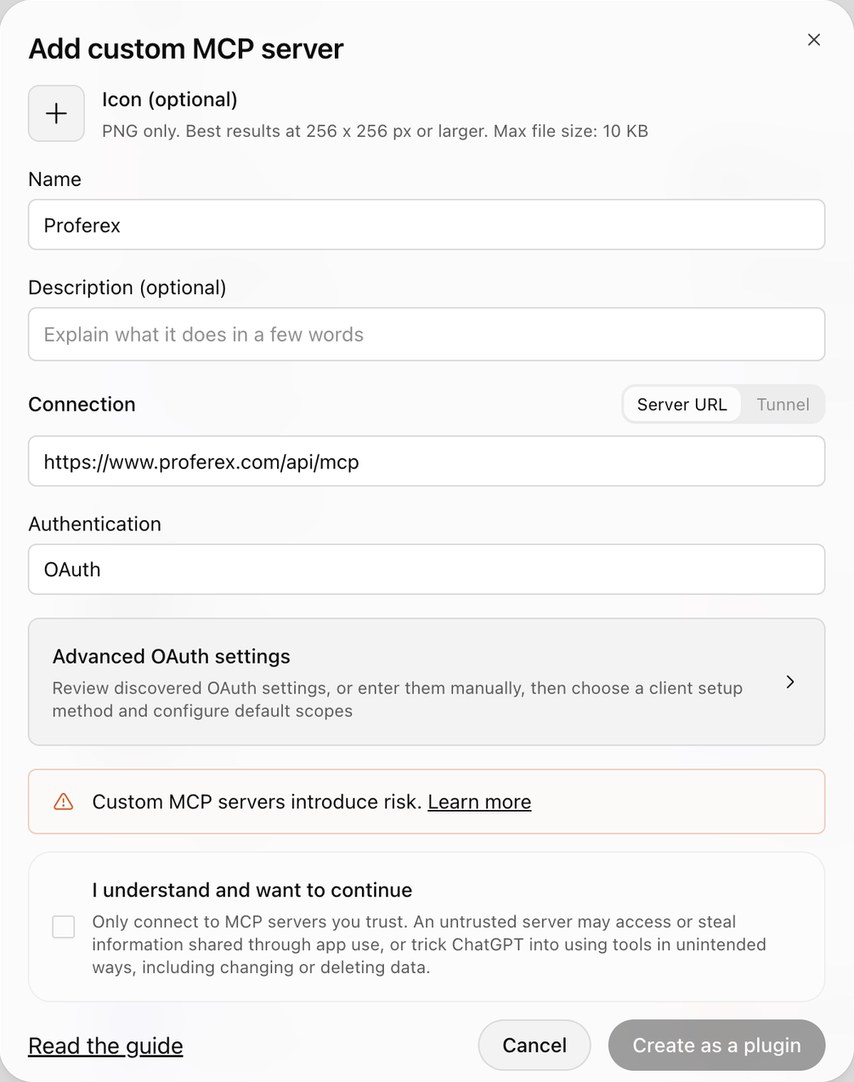
Add a custom MCP server with the Proferex address.
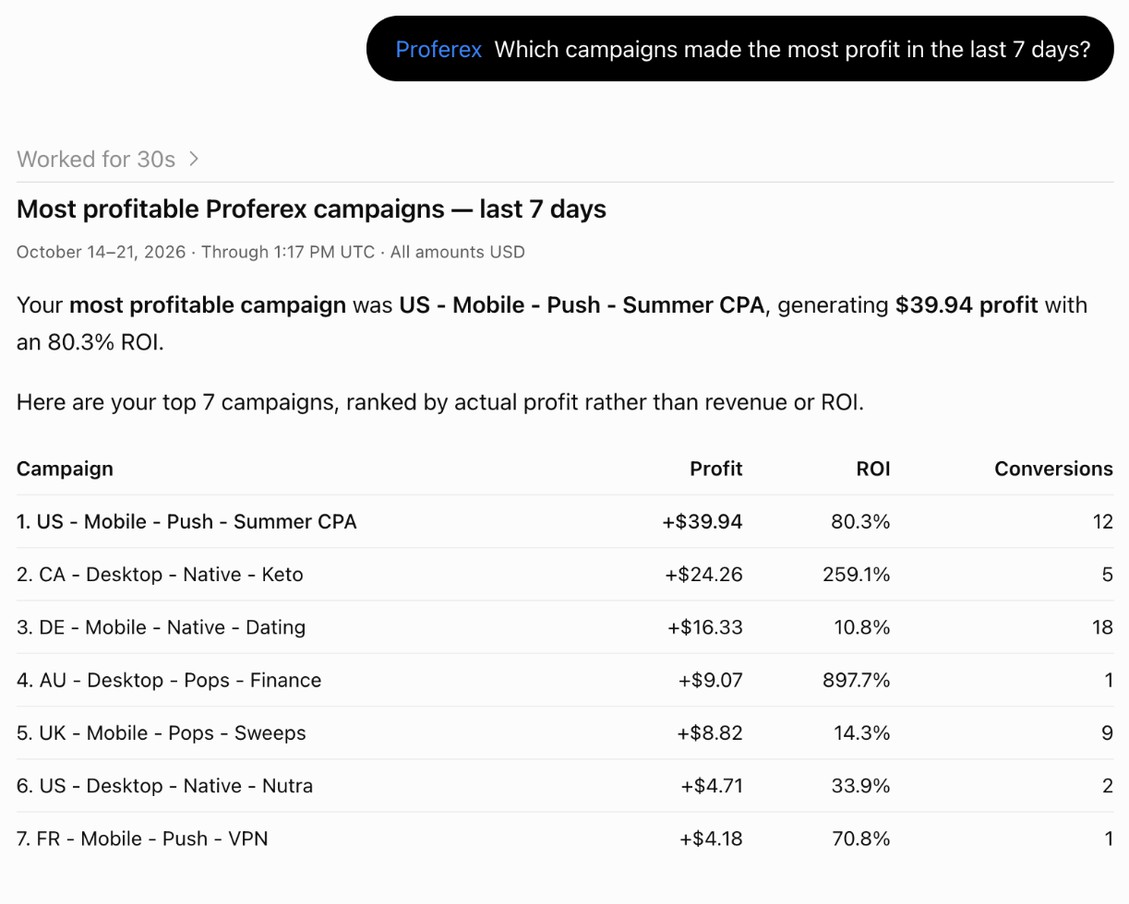
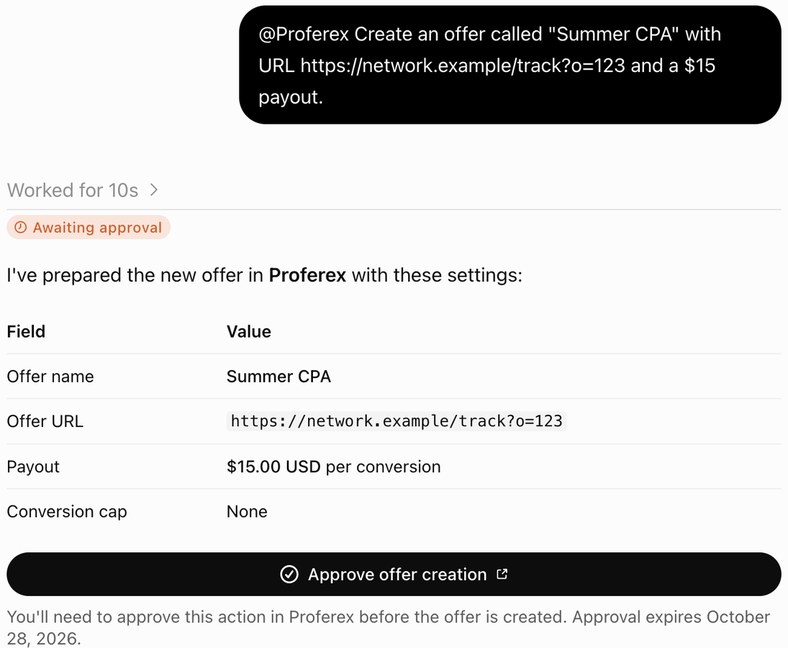
What you can ask
What can ChatGPT do in Proferex?
Check your numbers, sort out a missing conversion or set up your next campaign. Pick a topic and copy an example.
Which campaigns made the most profit in the last 7 days?
Compare my offers in the US on mobile, last 7 days vs last 30 days, in a table.
Which hours of the day are losing money on my US campaign?
See the full list of changes your AI agent can make.
Making changes
Review what gets saved
By default, changes wait for your OK in Proferex. You can choose to confirm small tracker changes in your AI app.
See the details
Review the campaign, offer or post and the values the agent wants to save.
Ask for a revision
Want a different payout or another version of a post? Tell the agent what to change.
Check the result
Ask the agent to read the saved settings or pull a fresh report.
Compare apps
Which one should you use?
Use the app you already work in. Here's where each one runs and how to connect it.
| ChatGPT | Codex | Tracker Agent | |
|---|---|---|---|
| Where it runs | ChatGPT on the web | Your terminal | Inside Proferex |
| How you connect | Custom MCP server under Plugins | One command | Nothing to set up |
FAQ
Common questions
Still have a question?
Send us a message. We'll help you get connected.
Why can ChatGPT read but not propose changes?
It was connected without the write scope. Disconnect it under Account → Connected AI Apps → Connections, tick write under Default scopes in ChatGPT, and connect again.
Do ChatGPT and Codex share one connection?
No. Each needs its own. Add Proferex in ChatGPT under Plugins, and in Codex from the terminal.
How do I use Proferex in a chat?
Type @Proferex in the message box, pick Proferex from the list, then ask your question.
What do I need?
An active Proferex plan and an AI agent that can add a custom MCP server. Some apps only allow that on a paid plan.
Can I ask about one campaign?
Yes. Give it the campaign name and the dates you want to check. You can narrow the report to a country, device, offer or lander too.
Does it use my Proferex AI credits?
No. Your AI agent's own plan covers the chat. Only the Tracker Agent built into Proferex uses credits.
How fresh are the numbers?
It reads the same data as your reports in Proferex. You can ask it to pull the report again for the latest numbers.
How do I disconnect it?
Go to Account → Connected AI Apps → Connections and click Disconnect. The app loses access immediately.
Other AI agents
Use a different AI agent?
Proferex works with any app that can add an MCP server. Here's how to connect each one.
Connect ChatGPT to your tracker today.
Choose a Proferex plan, connect ChatGPT and ask about your campaigns.
Get started