

 VII
VII
Scaling
Grow a profitable campaign vertically, and horizontally across campaigns and traffic sources.
This page shows you how to grow a campaign that makes money, and how to use Proferex to check that it keeps making money as it grows.
There are two ways to scale:
- Vertical scaling buys more traffic for the campaign you already have, for example with a higher budget or bid.
- Horizontal scaling adds more campaigns. Start with more campaigns on the same traffic source, then add campaigns on other traffic sources. Each new campaign either reaches more of the same audience or targets a different one.
Once a campaign is profitable by a decent margin, consider both. Vertical scaling has a ceiling, because each campaign's audience runs out. Horizontal scaling keeps growing past it.
When a campaign is ready
A campaign is ready to scale when all of these are true:
- It's profitable by a decent margin. A campaign at 10% ROI has no room to absorb the higher prices and untested traffic that come with scaling. Aim for a margin comfortably above your target, such as 30% or more.
- Profit is steady. Daily Performance on the campaign's Main tab shows a positive ROI on most of the last 7 days, not one big day.
- There are enough conversions. At least 30 or so in the period, so the ROI isn't luck.
- It doesn't hang on one placement. On the campaign's Analytics tab, group by the V that holds the spot ID. If one spot makes most of the profit, scale that spot on its own first.
- It's already optimized. The offer, ads, and lander are the winners of their tests, and losing placements are blocked. See Optimization.
Vertical and horizontal compared
| Vertical | Horizontal | |
|---|---|---|
| What you do | Buy more traffic for the same campaign | Add campaigns for more audiences |
| Where | The campaign at your traffic source | New campaigns at the same or other traffic sources, each with its own campaign in Proferex |
| How fast | Fast. Changes take effect the same day. | Slower. Each new campaign needs its own tests. |
| Limit | The campaign's audience. Past a point, more budget only buys worse traffic at a higher price. | Only the countries, audiences, and traffic sources the offer works for |
| Risk | Low to medium | Medium. Each new campaign starts untested. |
Most campaigns grow best with both. Scale vertically until ROI starts to fall toward your target, then add campaigns horizontally while the first one keeps running at the budget that worked.
Vertical scaling
Vertical scaling gets more out of one campaign. Every change happens at your traffic source. Click API on the campaign's page, then Campaign Overview, to open it there. See The API window.
Raise the budget or bid
Raise the daily budget at your traffic source in steps of about 20% to 30%, and wait a day or two between steps.
A higher bid wins more traffic, and often better traffic from earlier in visitors' sessions, but past a point you pay more for traffic you were already winning. How far you can go depends on the bidding method. A dynamic bid is forgiving, because you pay close to what each impression takes. A static bid needs small steps, because you pay your full bid on every impression.
After each step, check Visits, CR, CPV, and ROI in Daily Performance. Stop raising when ROI falls toward your target. See Find the right bid.
Bid more on the best placements
On the campaign's Analytics tab, click the V that holds the spot ID and sort by Profit. Spots with a high ROI and plenty of spend are where the next dollar does the most. Many traffic sources let you raise the bid for a single spot.
Add new ads
An ad that works today wears out as the same people see it again and again. Its CTR and CR then drift down in Daily Performance. Keep testing new ads against the winner, so you have a replacement ready. New ads also reach people the old ones didn't catch.
Compare them on the V that holds the ad, on the campaign's Analytics tab. See Test your ads.
Loosen the frequency cap
Raising the frequency cap shows your ad to each person more often, which buys more volume from the same audience. Raise it one step at a time and watch CR in Daily Performance. When CR starts to fall, go back a step.
Add hours back
If you cut hours during optimization, the Heatmap shows which ones were close to breaking even. Adding them back brings a little extra volume at best. Add one block of hours at a time and check Hour of Day on the campaign's Analytics tab a few days later.
Horizontal scaling
Horizontal scaling adds campaigns. Each one gets its own campaign at the traffic source and its own campaign in Proferex, so you can read and optimize it on its own.
Every new campaign starts untested, even with the same offer. Start it at a lower budget than the original, and optimize it from the offer down. See Optimization.
More campaigns on the same traffic source
Start here. You already know the traffic source's placements, ad formats, and bidding, so a new campaign there has the best chance.
Each new campaign should reach a new audience. Common ways:
| New campaign | Example | What to check |
|---|---|---|
| Another country | Push - CA - Mobile next to Push - US - Mobile | The offer runs and converts in the new country. Run one country per campaign. |
| Another device | A desktop campaign with a desktop offer | The device matches the offer |
| Another ad format | Native - US - Mobile next to Push - US - Mobile | The lander and ads suit the new format |
| Another connection or OS | A carrier-only campaign with its own bid | Proferex showed that part converting differently |
| Your best placements | A campaign that targets only the winning spots, with a higher bid | The spots had enough spend to trust |
To create one:
- Open the original campaign and pick Duplicate Campaign from ⋯. The copy keeps the combination, traffic source, group, and cost settings.
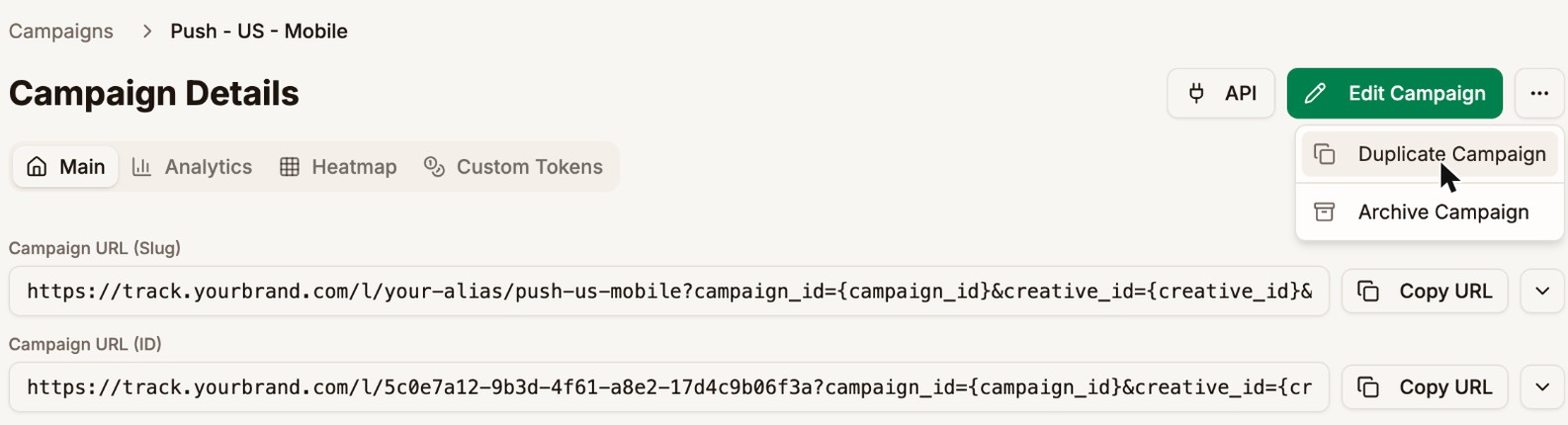
- Edit the copy. Rename it, such as Push - CA - Mobile, and set its Country.
- If the offer doesn't fit the new audience, give the copy a combination with an offer that does. Check the offer source's detail page for offers that already convert there. See Detail Pages.
- At your traffic source, create a campaign for the new audience that uses the copy's URL.
Campaigns on other traffic sources
Once the offer works on one traffic source, try it on others. Each traffic source has its own users, placements, and ad formats, so the same offer can find a whole new audience.
- Duplicate the campaign, as above.
- Edit the copy and set the new Traffic Source. The campaign URL then carries that traffic source's variables.
- At the new traffic source, create a campaign that uses the copy's URL.
Expect to test ads and placements from scratch on the new source. Compare your traffic sources on their detail pages, or with Traffic Source ID in Analytics.
Keep track of a growing portfolio
Horizontal scaling turns one campaign into many. Keep them organized so you can see each group at a glance:
- Put campaigns in groups, such as Push, Native, and Pop. In Tracker → Campaigns, By Group adds up each group, and Filter by Group shows one group at a time.
- Set each campaign's Country. By Country then adds up each market.
- Name campaigns the same way, such as Format - Country - Device. A Campaign Name filter in Analytics, such as i~
- US -, then picks out every campaign for one country. - Group by Campaign Group and Campaign Country in Analytics to see each format in each market in one table.
- Check each offer's detail page. The Campaign tab shows every campaign the offer runs in, so you can see where it works and where it doesn't.
Watch it while it grows
After each change, check:
| Check | Where | Warning sign |
|---|---|---|
| ROI by day | Daily Performance | ROI falls two days in a row |
| Cost per visit | Daily Performance, CPV | CPV rises faster than EPV |
| New placements | Analytics tab, spot V sorted by Cost | New spots with spend and no conversions |
| Offer caps | The offer's detail page, Daily | Conversions stop while visits carry on |
| Ad wear-out | Analytics tab, the ad V | The winning ad's CR falls week after week |
If ROI drops below your target and you can't see why, step back to the last budget or bid that worked. If a campaign starts losing money, pause it from the API window while you look into it.
Worked example
Push - US - Mobile on TrafficStars made a 73% ROI at about $126 a day, well above the 30% target.
Vertical. The budget went up by about 25% every two days:
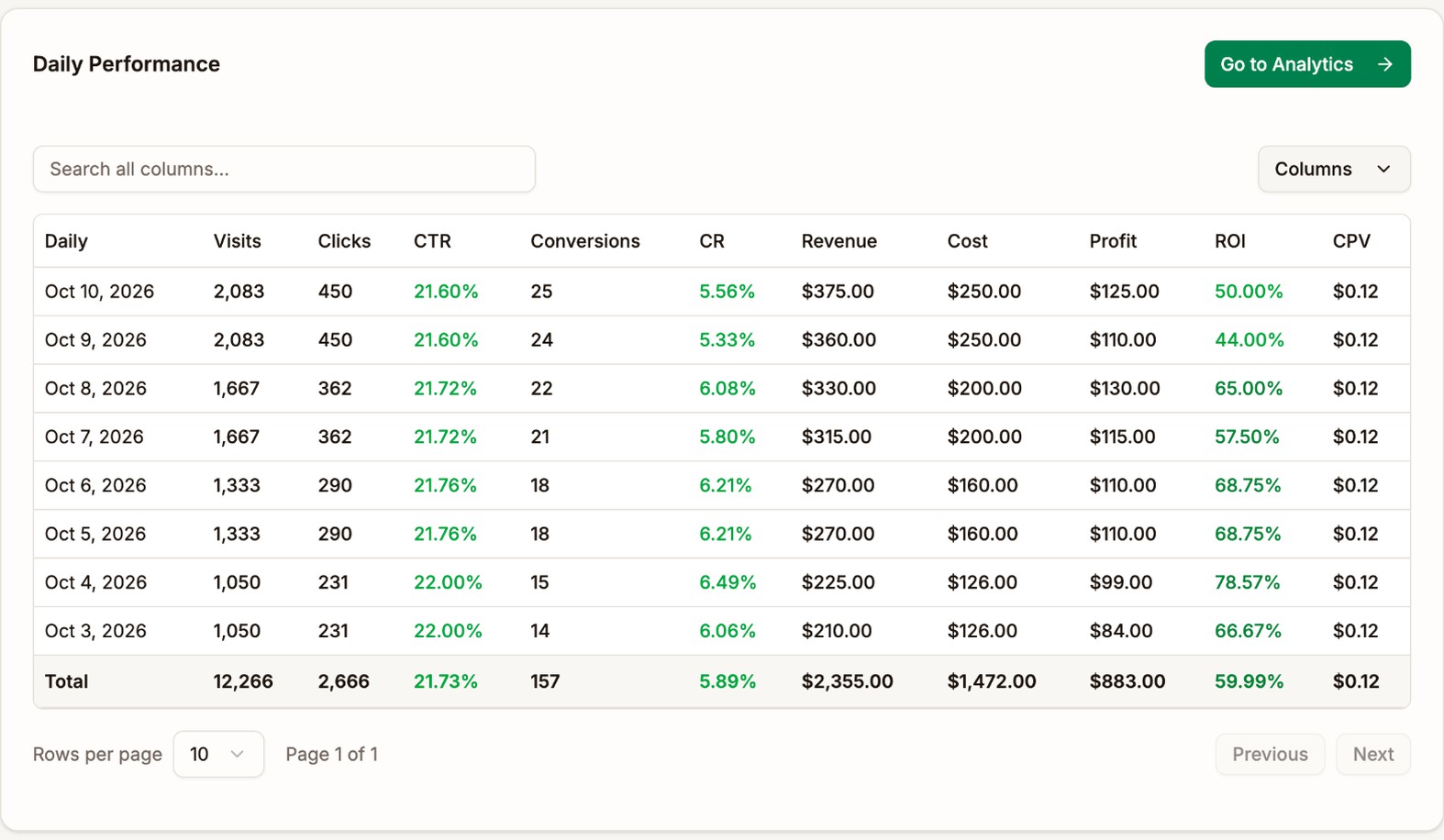
| Days | Daily spend | Daily profit | ROI |
|---|---|---|---|
| Oct 3 to 4 | $126 | $92 | 73% |
| Oct 5 to 6 | $160 | $110 | 69% |
| Oct 7 to 8 | $200 | $123 | 61% |
| Oct 9 to 10 | $250 | $118 | 47% |
ROI fell at each step, but daily profit kept rising until $200 a day. At $250 a day, profit dropped while spend rose, so the budget went back to $200. That was the campaign's ceiling.
Horizontal. Once the first budget step held up, two new campaigns started on Oct 5 at $60 a day each:
| Campaign | Traffic source | ROI, Oct 5 to 11 | ROI, Oct 12 to 18 |
|---|---|---|---|
| Push - CA - Mobile | TrafficStars | 12% | 43% |
| Native - US - Mobile | TrafficJunky | -18% | 25% |
The Canadian campaign needed a different offer and new ads. The TrafficJunky campaign needed its own spots blocked and a different lander for native traffic.
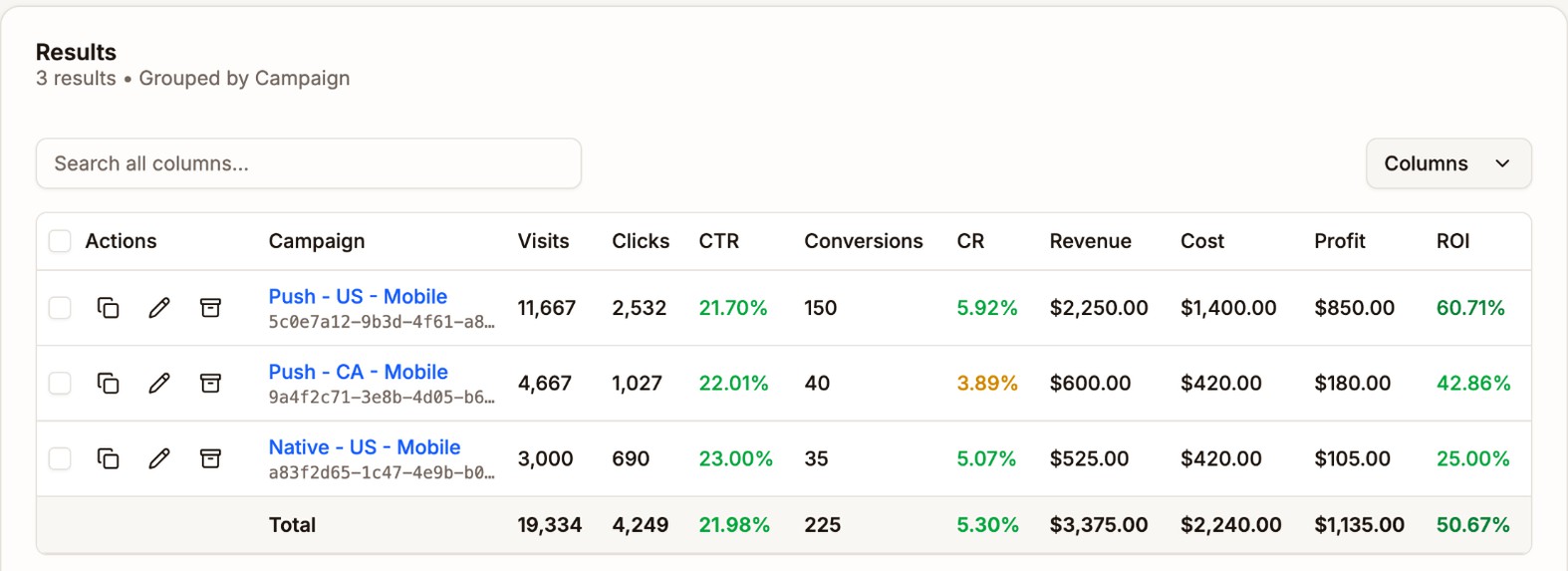
In the week of Oct 12, the three campaigns made $1,135 together. The US campaign alone made $850 at its best budget, and more budget would only have made it less.
Next step
When a number in Proferex doesn't match your traffic source or offer source, see Why Numbers Differ.