

 VII
VII
Optimization
A step-by-step routine for turning a losing campaign into a profitable one.
This page gives you a routine for making a campaign profitable: what to look at in Proferex, in what order, and what to change once you've found it.
Proferex shows you where a campaign makes and loses money. Most of the changes then happen in your traffic source: the ads, the targeting, the frequency cap, and the bid. The offer and the lander are the two you change in Proferex, in the campaign's combination.
Before you judge anything
A decision made on too little data is a guess. Before you change anything:
- Wait for enough spend. Give each ad, lander, or placement two to three times your payout in spend before you judge it. With a $15 payout, that is $30 to $45.
- Match your traffic source's timezone. Set Timezone to the one your traffic source reports in, so each day's cost and visits line up.
- Leave today out. Today isn't finished, and late conversions still arrive. Judge yesterday and the days before.
- Wait for yesterday's cost. Synced cost for yesterday is final about two hours after midnight in your traffic source's timezone.
- Change one thing at a time. If you change the ad and the bid on the same day, you can't tell which one moved the numbers.
See Why Numbers Differ for the other reasons a number can look wrong.
The order to work in
Work from the biggest lever to the smallest. Each step only pays off once the steps before it are right.
| Step | What you're testing | Where to look in Proferex | Where you change it |
|---|---|---|---|
| 1. Offer | Whether the offer can make money at all | Offer ID in Analytics, the offer's detail page | The campaign's combination |
| 2. Ads | Which ads bring visitors who convert | The V that holds the ad or creative | Your traffic source |
| 3. Lander | Which lander warms visitors up best | Lander + Offer Performance | The campaign's combination |
| 4. Targeting | Country, device, placements, and frequency cap | The V that holds the spot or zone, OS, Connection Type | Your traffic source |
| 5. Bid | The price that buys good traffic in enough volume | Daily Performance | Your traffic source |
| 6. Hours | The hours that lose money | Heatmap, Hour of Day | Your traffic source |
1. Start with a great offer
The offer comes first, because nothing else can fix it. With a weak offer, better ads, landers, and targeting only lose money more slowly. Finding offers that convert is the groundwork for everything below.
To judge an offer:
- Compare offers on EPC, revenue per click. EPC folds the payout and the conversion rate into one number. An offer that pays $20 and converts at 2% earns $0.40 a click, and one that pays $15 and converts at 4% earns $0.60.
- Test two or three offers for the same country and device at once. Put them on equal weights in the campaign's combination, and move the weight to the winner once each has a few hundred clicks. See Weight.
- Check the offer's detail page, on the Campaign tab. If an offer converts in your other campaigns but not this one, the offer is fine and the traffic is the problem. See Detail Pages.
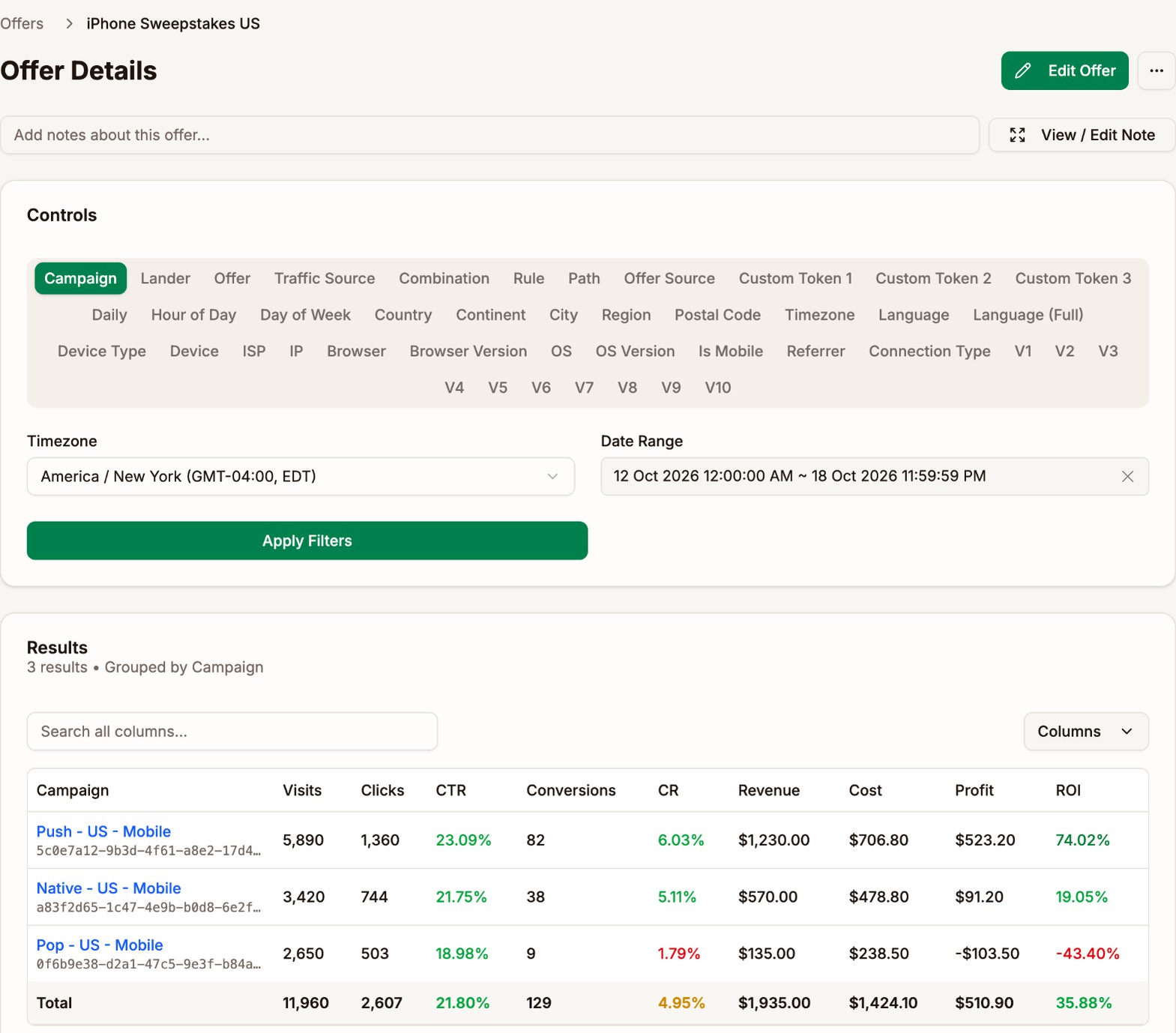
- Watch the offer's Daily numbers. An offer whose conversion rate drops while traffic stays the same may have been capped or changed by the advertiser.
Ask your affiliate manager which offers convert best for your country, device, and traffic type. Their numbers from other affiliates are a good place to start.
2. Test your ads
Ads are one of the strongest levers you have. A good ad brings visitors who are interested in the offer, so more of them click through the lander and convert.
Look for ads with a high, relevant CTR. A misleading ad can win a high CTR at the traffic source and still lose money, because the visitors it brings don't want the offer. Judge each ad on what its visitors do after the click, in Proferex.
To compare ads:
- Open the campaign's Analytics tab and click the V that holds the ad. With the templates, that is V1 (Banner Name) or V10 (Banner ID) on TrafficJunky, and V2 (Creative ID) on TrafficStars and ExoClick. Hover over the V tabs to see what each one holds.
- Compare CR, EPV, and ROI for each ad.
- At your traffic source, pause the ads that lose money and add new ones to test against the winners.
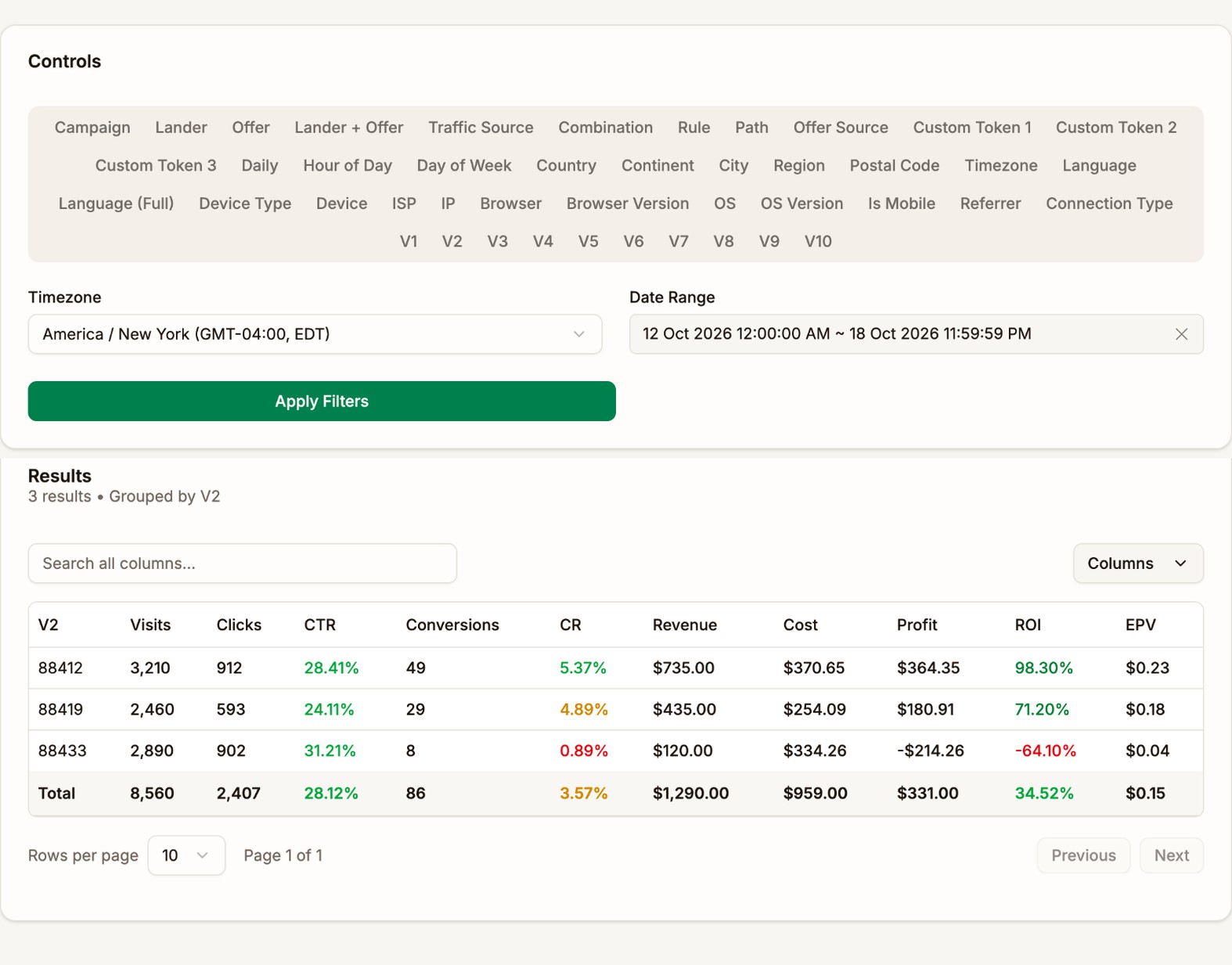
Ad 88433 sends the most visitors through the lander, with a 31% CTR, but almost none of them convert. Its message doesn't match the offer. Pause it, and test a new ad built on what 88412 promises.
3. Test your landers
A prelander warms visitors up for the offer. A good one sends more visitors on to the offer, and sends them ready to convert.
On the campaign's Main tab, compare the landers in Lander + Offer Performance:
- CTR tells you how many visitors the lander sends on to the offer.
- EPV, revenue per visit, tells you which lander earns more for each visitor you pay for. It counts both the clicks and the conversions.
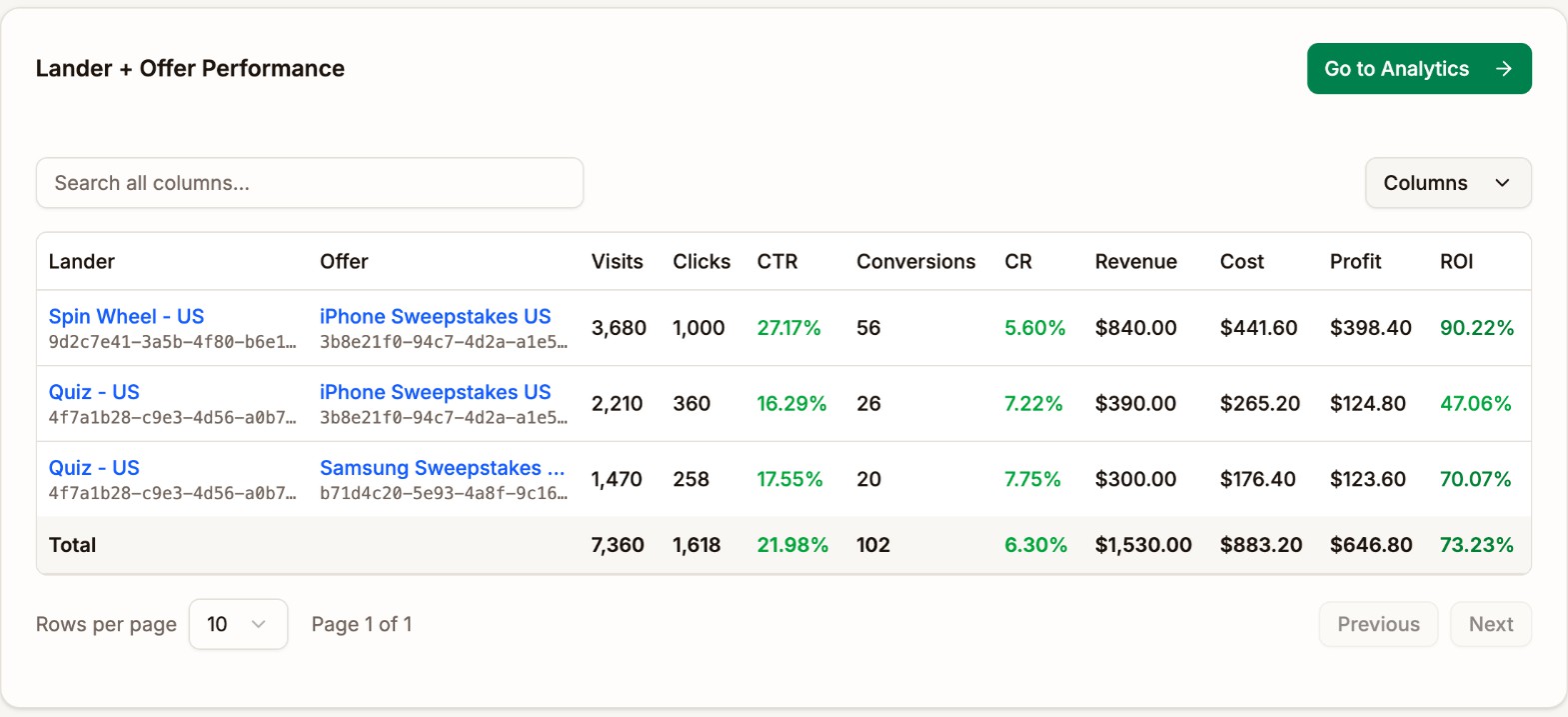
Wait until each lander has a few hundred visits, then move weight to the one with the higher EPV. Keep the other one on a small weight, such as 10%, if you want to keep testing. See Weight.
4. Tune the targeting
Targeting is set at your traffic source. Proferex shows you which parts of the traffic make money, and you change the campaign there.
Run one country per campaign. Each country performs very differently, with its own offers, prices, and placements. A campaign per country lets you set the bid, ads, and placements for each one, and keeps one country's results from hiding another's. Set the campaign's Country in Proferex too, so you can compare countries in your lists and in Analytics.
Match the device to the offer. A mobile offer needs mobile targeting, and a desktop offer needs desktop targeting. Then check the split in Proferex: group by OS, Device Type, or Connection Type to see whether, for example, Android converts and iOS doesn't, or Wi-Fi converts and mobile data doesn't. If a part loses money, target it out, or give it a campaign of its own.
Block the placements that lose money. Most traffic sources sell ads on many sites, spots, or zones, and a few of them often eat most of the budget.
- Open the campaign's Analytics tab and click the V that holds the placement: V9 (Spot ID) on TrafficJunky, V3 (Spot ID) on TrafficStars, or V5 (Zone ID) on ExoClick, if you used the templates.
- Sort by Cost.
- Note each placement that has spent two to three payouts and loses money.
- Block them at the traffic source. Click API, then Campaign Overview, or Sources on TrafficJunky. See The API window.
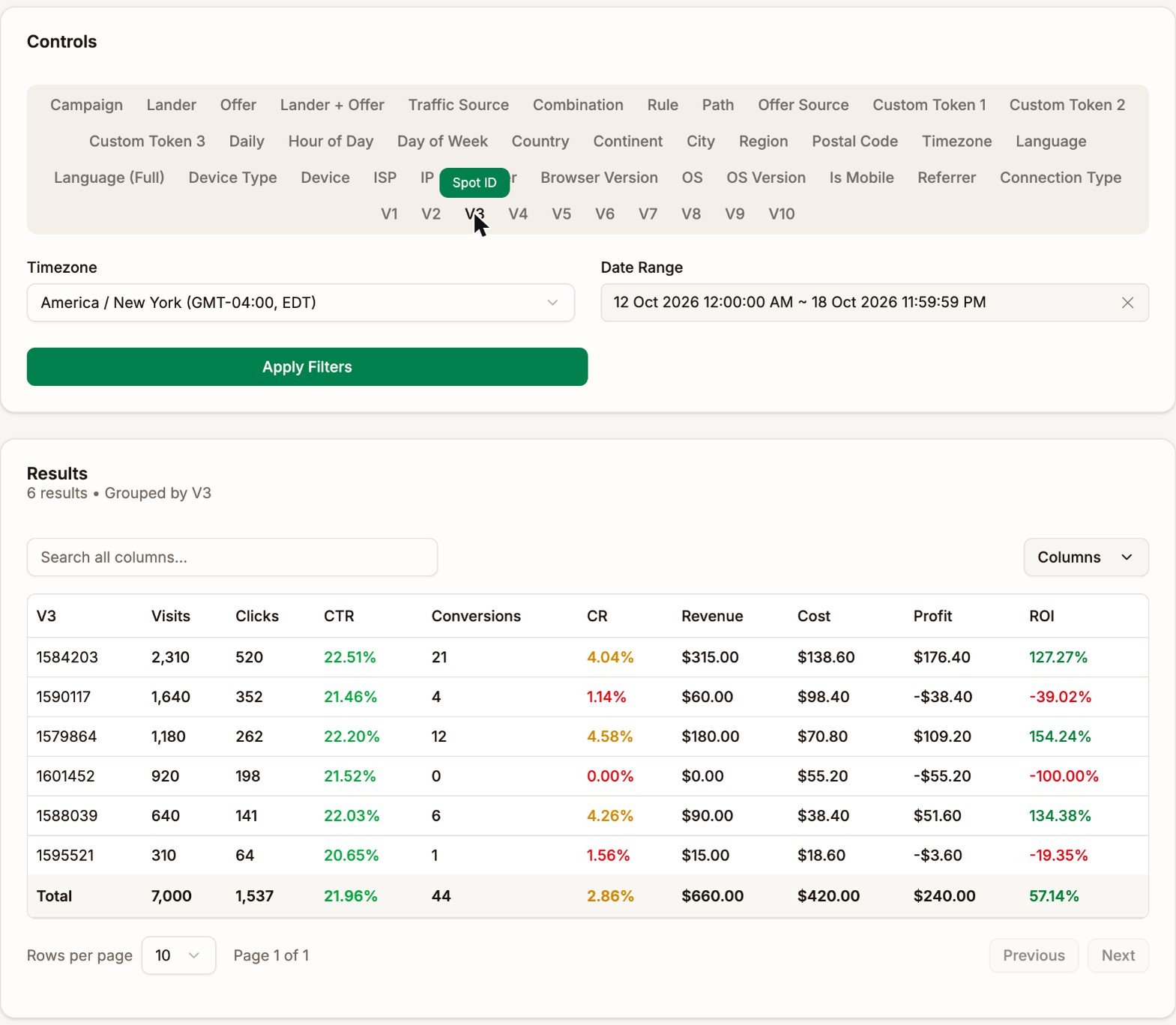
Look at the winners too. A placement with a high ROI and plenty of spend is one to bid higher on.
Set the frequency cap. The frequency cap at your traffic source limits how often one person sees your ad. A tight cap shows the ad to fresh people, who are more likely to act on it. A loose cap buys more volume, but much of it is the same people seeing the ad again. Change the cap in small steps and compare CR in Daily Performance before and after.
Other targeting, such as browser, operating system version, or carrier, depends on the offer. Add it when Proferex shows a clear difference, not by default.
5. Find the right bid
The bid decides both how much traffic you get and how good it is. The best bid sits in the middle.
- Bid too low and you get less traffic, and worse traffic. Low bids tend to win the impressions deep into a visitor's session, after many other ads, when people are less likely to act. Lowering the bid can lower your cost per visit and your conversion rate at the same time.
- Bid too high and you overpay for traffic you'd have won for less.
How carefully you set it depends on your traffic source's bidding method:
| Bidding method | How it behaves | How to set it |
|---|---|---|
| Dynamic | You pay close to what it takes to win each impression, up to your bid | More forgiving. A bid on the high side mostly costs you only what the market asks. |
| Static | You pay your bid for every impression you win | Needs more care. Every cent above the market is paid on every impression. Raise or lower it in small steps. |
To check a bid, compare CPV, cost per visit, with EPV, revenue per visit, in Daily Performance. The most you can pay per visit and still make a target ROI is:
highest cost per visit = EPV ÷ (1 + target ROI)For example, with an EPV of $0.21 and a target ROI of 30%, the most you can pay is $0.21 ÷ 1.3, about $0.16 a visit. Treat this as a ceiling, not a target. Bidding far below it often buys worse traffic, and EPV falls with it.
After each bid change, watch three numbers in Daily Performance for a few days: Visits for volume, CR for quality, and ROI for the result. A good bid keeps all three where you want them.
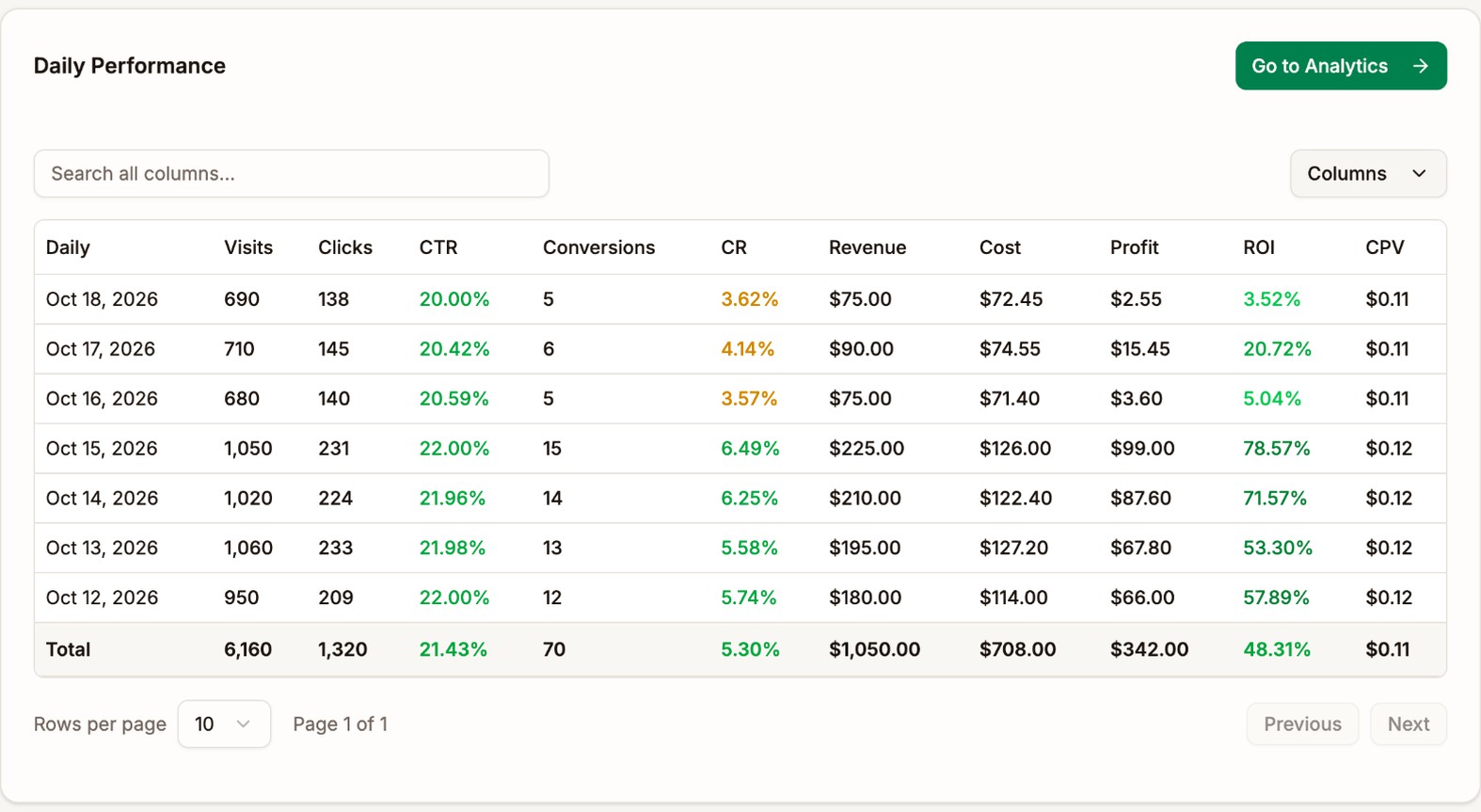
Here the static bid was lowered on Oct 16. Each visit got cheaper, but the campaign lost a third of its visits and its conversion rate fell from about 6% to under 4%. ROI fell from 50% to 80% a day to under 21%. The bid went back up.
6. Cut the hours that lose, last
Hours come last. Dayparting rarely brings a losing campaign back to profit on its own. It trims the edges of a campaign that already works.
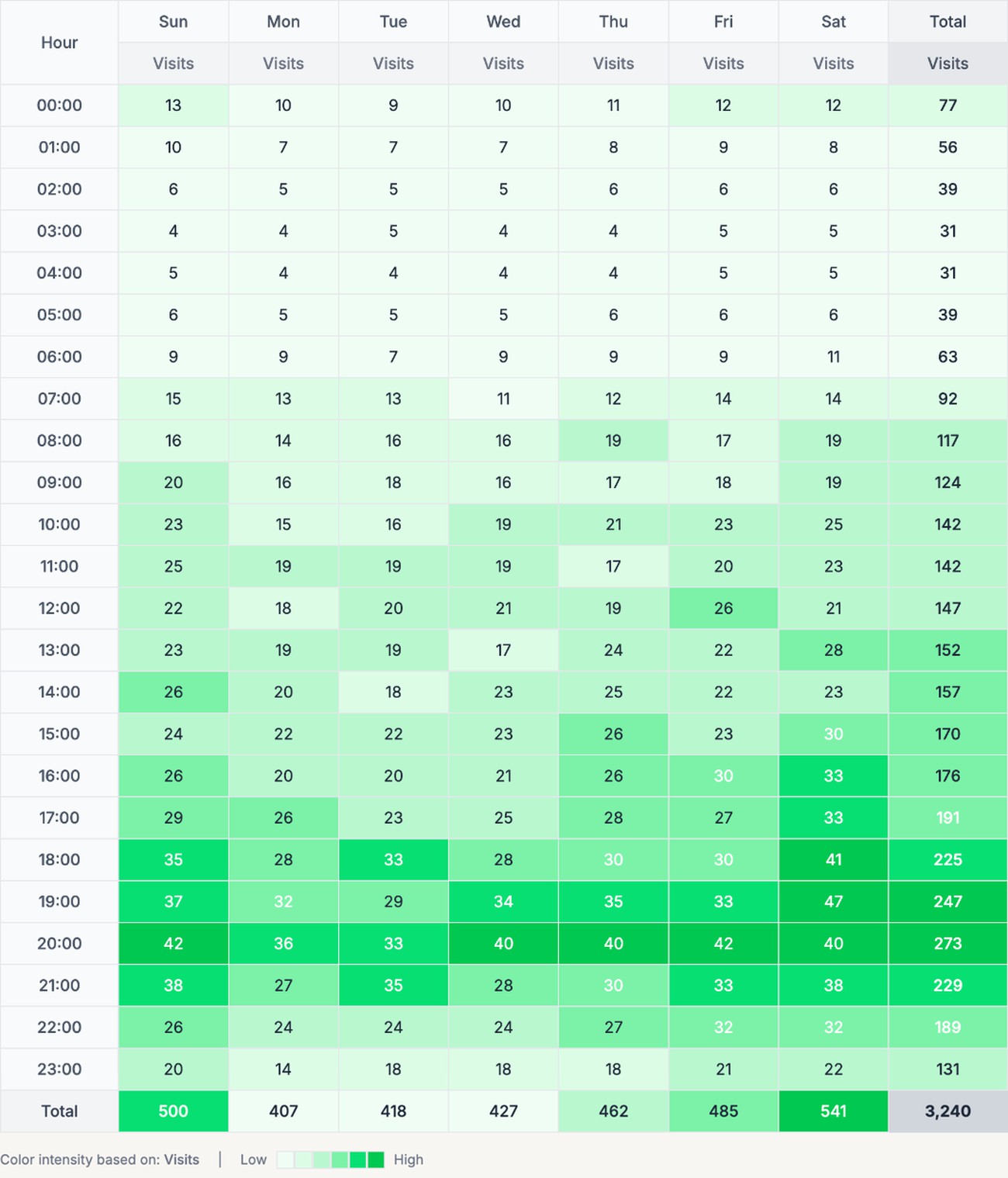
Open the campaign's Heatmap with Last 30 days, show Profit, and color by Profit. If some hours are red on most weekdays, stop buying them in the campaign's schedule at your traffic source. See Campaign Reports.
Worked example
Pop - US - Mobile lost money for a week:
| Visits | Cost | Revenue | Profit | ROI | |
|---|---|---|---|---|---|
| Week 1 | 2,650 | $238.50 | $135.00 | -$103.50 | -43.40% |
Following the steps:
- Offer. The offer's detail page showed iPhone Sweepstakes US making money on push traffic but not on pop. On this traffic, PS5 Sweepstakes US earned $0.41 a click against $0.27. The combination's weight moved to the PS5 offer.
- Ads. Grouping by V2, the creative, showed one ad with a 31% CTR and almost no conversions. It was paused at ExoClick.
- Lander. Spin Wheel - US had a higher EPV than Quiz - US on the new offer, so it got 80% of the weight.
- Targeting. Grouping by V5, the ExoClick zone, showed four zones with $96.20 of spend and no conversions. They were blocked in ExoClick, and the frequency cap was tightened.
- Bid. The campaign was on a static bid. Lowering it by 10% cut visits by a third and CR with them, so it went back to where it was.
| Visits | Cost | Revenue | Profit | ROI | |
|---|---|---|---|---|---|
| Week 2 | 1,480 | $121.10 | $165.00 | $43.90 | 36.25% |
The campaign bought fewer visits, spent half as much, and made more revenue. Hours weren't touched, because the campaign was already profitable once the offer, ads, and placements were right.
A routine to keep
Every day
- Check Daily Performance on each campaign that spends.
- Pause any campaign that loses money two days in a row, until you've found the cause.
Every few days
- Compare ads and landers, and add new ones to test against the winners.
- Sort each campaign's placements by Cost and block the new losers.
Every week
- Look for new offers to test, and check each offer's detail page for drops.
- Review bids, frequency caps, and, last, the Heatmap.
Next step
Once a campaign makes money, grow it. See Scaling.